Wednesday, September 26, 2012

Three Dimensional Layers

Learn about 3D and Layers.

Make something recognizable. A bird, chair, horse, cat, car, logo, etc. anything that is more than just random chunks of blah.


Turn it in by posting the finished URL as a comment.

To comment on blogspot, click the "0 comments" on the bottom of this page.

Comment as: Name/ URL from the drop down.

Monday, September 24, 2012

FIRST DAY!! - - Who are you, who is Mr. Hurst?... - Tech Savvy Survey


Today you are to fill out both of these forms, after you fill these both out we can hang out get to know each other, have free time on the computer, etc.

Get to know Mr. Hurst, and let Mr. Hurst get to know you


How Tech-Savvy Are You?

Wednesday, May 23, 2012

Our last day...

http://ie.microsoft.com/testdrive/

Monday, May 21, 2012

Chrome Theme


Step one, use the browser Google Chrome

Feel free to try out this Lane theme. 

The themes, or skins for various applications make the GUI (Graphic User Interface) fun to use and personalized to your own style. Today create a theme using this website below and then send me using Drop it to me the finished "pack and download theme" file which ends in the extension .crx.

http://www.chrometheme.net/chrome-theme-creator-online.html <- CREATE IT HERE.

Be creative, do whatever you want for colors and pictures (school appropriate).


Step 3. Once you have finished. "Pack and download theme"


rename it to your name.crx


hurst.crx


Then upload the completed file to me using drop it to me.
password: lane

http://dropitto.me/lane <- click this to upload completed file. 

Wednesday, May 16, 2012

Spirit Week - Teamwork Info graphic


Today we are going to work on a teamwork assignment,
Pair up with one or two other people and then create this spirit week info graphic.

Find pictures for each themed day.
As you see in the examples, feel free to be creative while still communicating each day.

Use Google Chrome as your browser

COPY and PASTE using RIGHT CLICK COPY ON THE PICTURE, then CTRL + V on the Google Drawing.

Choose a team and get started.
Once one team name / project is taken move to a different one, I can change the team names if needed but it'd be after we get started so you would have to refresh the page.


Monday, May 14, 2012

Heat and Electronics


A computer and it's processor takes electricity and moves it quickly through transistors and circuits in order to do things the faster it works the warmer it will get.

This heat needs to be cooled down otherwise it will slow down the computers ability to move the electricity and thus slow down your computer experience.

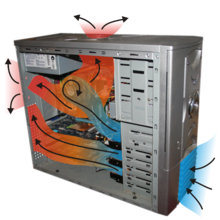
Computers use Heat Sinks which are usually made of aluminum to move the heat away from the processor and then fans to blow the hot air away.


Typical desktop computers should be around 100-125 degrees at their processor.

The max heat a desktop should ever be is 180 to 190 degrees, this heat is located at the processor and will overheat if any higher.

Once a computer overheats it will shut down automatically in order to save it from harming any of it's parts.


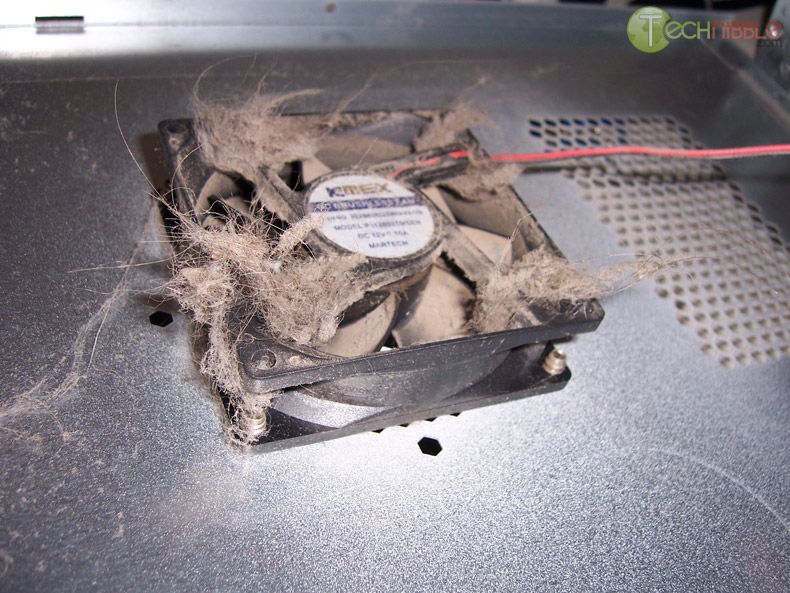
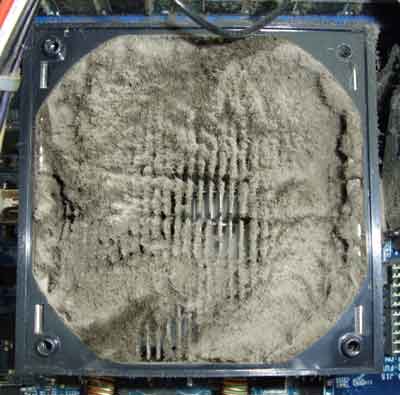
Dust is bad for computers and other electronics because it slows down the cooling fans that are trying to move the hot air out. Also it makes it so air can not flow away from the hot areas as well causing overheating a lot easier.

Some Computers use other methods that wouldn't be affected by dust like water to cool down the processor. Water and electricity are usually not good things to combine but in these specific uses with controlled flow it is an effective way to cool down super computers and gaming computers that use a lot more electricity and work faster than normal computers.

Most electronics follow this same idea, some however are not as powerful or do not move as much electricity so they do not get as hot, and do not need as much to cool them off.

Sometimes electronics can malfunction causing a massive overheating, this is uncommon but possible.
 Again typically they have built into them ways that they automatically turn off and don't let you use it until it is  cooled down again.

What you can do about it..

If it's overheating, turn it off and let it chill out.
Make sure to ask permission before working on any electronics but making sure they are cleaned with compressed air or some vacuum cleaners that can also clean electronics, sometimes simply blowing the dust out with your own breath is helpful.
Turn on a fan, open a window, make sure nothing is covering the vents or fans of electronics and so they have room to get the heat out.
Limit the use of electronics in extremely hot conditions.

Take this little quiz.


Burn something (simulated)!!!

Wednesday, May 9, 2012

Yo Mama Nice


With Mother's Day coming up we are going to make, NICE Yo Momma Jokes that are uplifting and positive, if you want you can create a card or visual to go with it and print it out for her.


The idea is to spur creative content creation and provide positive ideas into our community not hateful ones.

Write 3 unique jokes, submit them here.
No copying other peoples, each should be your own unique joke.


EXAMPLES....

Yo mama cares about you so much, she wants you to have a good education and healthy social life!

Well yo mama can bring home the bacon AND fry it up in a pan. All crispy and nice y'all.


Yo mama is so sweet the Care Bears put a hit out on her because she was too cute and stuff..


Your mom went to college, and now she's rolling in the dough!


Yo mama is like the energyizer bunny, her love just keeps going and going and going...


Yo mama pays so much taxes, b'cauz she's got an amazing job!


You mama can cook so well even Ratatouille will stop by for dinner.


Yo mama is so healthy ...
Yo mama is so considerate ...
Yo mama is so smart ...
Yo mama is so successful ...
Yo mama is so beautiful ...
Yo mama is like ...


One way to get started would be to research on the hateful ones and then change them around once you have them for inspiration.